There’s a new rule landing on 19 June 2026, and if you sell to customers in the EU, it will likely mean you need a small (but very much mandatory) change to your website.
It’s the kind of thing that’s easy to miss, because the law it comes from sounds like it has nothing to do with you. So let’s clear that up.
The short version
From 19 June 2026, online shops selling to EU consumers need to provide a “withdrawal button”: a simple, obvious way for a customer to cancel an order online, just as easily as they placed it.
That’s really the whole idea. The EU looked at how hard some businesses make it to cancel (buried forms, “email us” with no reply, a phone number that rings out) and decided that backing out of an online purchase should be as painless as buying in the first place.
If it took one click to buy, it should take roughly one click to cancel.
Where did this come from?
Here’s the bit that trips people up. The rule lives inside Directive (EU) 2023/2673, which on paper is about financial services sold at a distance. Read the title and you’d reasonably assume it’s a problem for banks and insurers, not your e-ecommerce store.
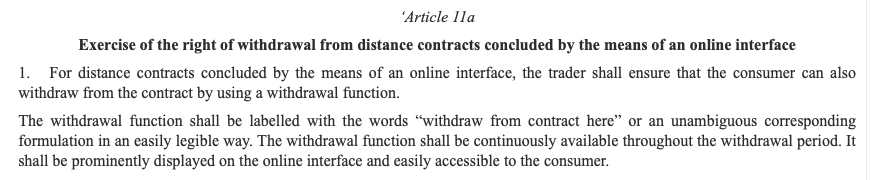
But tucked inside it is a new Article 11a, and that part is much broader. It applies to any distance contract concluded through an online interface where the customer already has a right to withdraw. In plain terms: ordinary online retailers are caught too, not just financial firms.
Worth saying clearly: This is an EU directive, not UK law. Post-Brexit, it doesn’t impact business carried out inside the UK. But, if you’re selling into the EU, it DOES affect you.
You’ll need to either follow it, or stop selling to EU customers (or risk a chunky penalty).
There are some exceptions where the right of withdrawal doesn’t apply but, if you’re currently offering a 14 day distance-selling returns policy, it’s almost certainly relevant.
What the button actually has to do
What the directive requires is less of a single button and more of a short, tidy process.
Broadly, you need:
- A clearly labelled withdrawal function. The wording has to be unambiguous, something like “withdraw from contract here.” No cryptic icons, no making people hunt for it.
- It has to be easy to find and available throughout the cooling-off period. The standard EU cooling-off window is 14 days, and the function needs to be prominent and continuously available for that whole time.
- It can’t hide behind a login. This is the one that catches people out. You can’t tuck it away so that only registered, logged-in customers can reach it. Guest shoppers who never made an account still need to be able to cancel, so the function has to be reachable without a prior login.
- A confirmation step. The customer fills in or confirms their details, then submits via a separate “confirm withdrawal” function.
- A receipt on a durable medium. After they confirm, you send an acknowledgement (an email is the usual route) without undue delay, with a record of the content and the time. That timestamp protects both sides.
- And no charging customers to use it.
A couple of things people get wrong
“So I need this on the My Account page?”
That’s a fine place to put it, but there then needs to be a way of getting to that page without logging in (from a confirmation email link, or order ID + Email Address). Think of it as something a customer can always find, whether or not they have an account.
“Does it matter if I’ve already shipped?”
The button is tied to the cooling-off window, not to whether the parcel has left the building. It needs to work throughout the 14 days. It also doesn’t invent a new right to cancel. It’s just an easier way to use the cancellation right that already exists, and the usual exceptions still apply. Made-to-order items, perishables, and unsealed hygiene products, for example, are typically not subject to withdrawal in the first place, so they’re outside this.
How chunky are the penalties?
Chunky enough to take seriously. The EU’s Omnibus Directive already toughened enforcement of consumer rules, and authorities can levy fines of up to 4% of annual turnover for widespread infringements, or up to 2 million euros where turnover figures aren’t available, with individual countries free to go higher. We’ve seen in the past that some countries will start pursuing enforcement from day 1, so this is worth getting right asap.
There’s a quieter risk too. If you don’t provide a compliant way to withdraw, a customer’s cancellation can still count as valid even if you never process it. So a missing button doesn’t make the cancellation go away. It just means you’re on the back foot, possibly out of pocket, and potentially non-compliant all at once.
On Shopify or WooCommerce? Don’t think it will be taken care of for you
This is where a lot of store owners assume their ecommerce platform will already handled for them. It doesn’t.
Neither Shopify nor WooCommerce ships a compliant withdrawal function out of the box. They both have cancel and refund tools, but those are designed for you, the merchant, to use from the admin side. They don’t meet the customer-facing requirements here: the prominent, clearly labelled button, the two-step confirmation, the guest access without login, and the automatic acknowledgement email. So having a refund button in your dashboard does not tick this box.
In practice that leaves you two routes:
- A plugin or app. There are already several plugins for WooCommerce and apps for Shopify built specifically for this directive, most of which handle the button, the confirmation step, guest access, and the email for you. If you go this way, check it actually covers all the requirements (especially guest withdrawal without a login) rather than just adding a button somewhere.
- A custom build. If your setup is bespoke, or you want it to behave exactly the way you’d like, this can be coded in. It’s not a huge piece of work, but it does need doing properly so the flow is compliant and the records are kept.
One honest note: the button is the easy part. The bit that actually matters is what happens after a customer clicks it, namely processing the withdrawal and refund within the legal window, reliably, even when a few come in at once. Whichever route you take, make sure the back end keeps up, not just the front end.
What to do now
With the deadline days away rather than months, this is a “check it this week” job if you ship to the EU:
- Work out whether you actually sell to EU-based consumers, and for which products a withdrawal right applies.
- Look at how someone cancels on your site today. Is it obvious? Can a guest do it without logging in? Could they do it in under a minute?
- If the answer is “not really,” map out a simple flow: a clearly labelled withdrawal function, a confirmation step, and an automated email acknowledgement with a timestamp.
- Sort out how you’ll deliver it. If you’re on Shopify or WooCommerce, that almost certainly means a plugin or app, or a custom build, since it isn’t there by default.
- If you’re unsure where you stand legally, get proper advice on your specific situation.
None of this is dramatic. It’s a small, well-defined piece of UX, and arguably the kind of thing a good checkout should have had anyway. Making it easy to leave tends to make people more comfortable arriving in the first place.
If you ship to the EU and you’d like a hand working out what your site needs, that’s exactly the sort of thing we enjoy. Give us a shout.